Introducing Shout: A Bold, Handwritten Font for Making a Statement
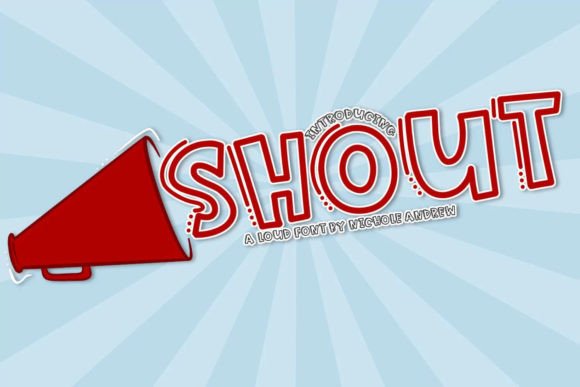
In the world of design and typography, the right font can make all the difference. It doesn’t just convey words—it amplifies messages, sets moods, and captures attention. For those who want to create an immediate visual impact, Shout is a powerful solution. This bold, handwritten display font is engineered to stand out, with shadowing lines that add depth and drama to any project. Whether you're designing for print or digital use, Shout brings energy and personality that help your content speak louder than ever.
What Is Shout?
Shout is a dynamic, high-contrast display font inspired by expressive handwriting. Its unique characteristics include exaggerated strokes, fluid curves, and subtle shadow effects that mimic the look of something written with intensity and passion. Unlike standard fonts that blend into the background, Shout commands attention. It's not meant for long paragraphs or body text but rather for headlines, logos, signage, and other design elements where making a strong first impression is key.
This font is especially valuable for creators who work with tools like Cricut, Silhouette, or similar cutting machines. The nodes in Shout are cleaned and optimized, which means it’s designed to cut cleanly and precisely without unnecessary complexity. That makes it a reliable choice when you need sharp edges and consistent results from your materials—whether vinyl, paper, fabric, or more.
When You Need to Make Noise Visually
There are countless scenarios where using a bold font like Shout can elevate your design. If you're launching a new brand, creating event posters, designing t-shirts, or crafting social media graphics, having a font that resonates with energy and emotion can set your work apart. But how do you know if Shout is the right fit for your needs?
- Designers and Artists: Looking for a way to infuse raw creativity into their projects? Shout offers a fresh take on handwritten typography that feels both modern and expressive.
- Business Owners and Marketers: Want to grab attention quickly? Use Shout for headlines, taglines, or promotional banners to make your message pop.
- Craft Enthusiasts: Need a font that cuts well and looks great on physical projects? Shout is optimized for use with cutting machines, ensuring clean lines and professional finishes.
- Event Planners: Creating signage for festivals, concerts, or product launches? Shout adds excitement and urgency to your visuals.
How Shout Solves Common Design Challenges
One of the biggest challenges in design is standing out in a crowded space. Generic fonts often fail to communicate the intended tone or emotion, especially in industries where uniqueness is essential. Shout helps overcome this by offering a distinct style that’s easy to recognize and hard to ignore.
Another issue many designers face is achieving consistency between digital and physical outputs. Fonts that look good on screen might not translate well when printed or cut. Shout was built with this in mind—its structure supports both digital and tangible applications, giving you peace of mind whether you’re working on a website or a custom sign.
Moreover, Shout simplifies the process of adding dramatic flair to your designs. Instead of layering multiple fonts or manually drawing letters, you can use Shout directly in your design software. Its shadowed lines already give it dimension, reducing the need for extra effects or filters.
Practical Uses of Shout
Let’s explore some real-world examples of how Shout can be used effectively:
1. Brand Identity and Logo Design
For startups or creative businesses, a logo that stands out is crucial. Shout’s loud, expressive style works well as a headline in a logo, especially for brands in music, fashion, entertainment, or lifestyle niches. Pair it with a minimalist layout or a vibrant color scheme to balance its intensity while keeping your branding clear and memorable.
2. Social Media Graphics
On platforms like Instagram, Facebook, or Twitter, users have seconds to decide whether to engage with your content. Using Shout in your headlines or call-to-action buttons can increase visibility and encourage interaction. It’s particularly effective in stories, announcements, or promotional posts where you want to evoke excitement or urgency.
3. Event Signage and Banners
At events, clarity and impact go hand-in-hand. Shout is ideal for large-format printing such as banners, posters, or stage backdrops. Its shadowing gives it a three-dimensional feel, helping it pop even from a distance. Just remember to pair it with sufficient contrast and legible supporting text for maximum effectiveness.
4. Merchandise and Apparel
If you're selling t-shirts, hoodies, or tote bags, a bold statement font like Shout can be the centerpiece of your design. Its natural flow and character make it perfect for short phrases or names. Since it's compatible with most cutting software, you can easily apply it to heat-transfer vinyl or direct-to-garment printing workflows.
5. Print Projects and Packaging
From book covers to packaging labels, Shout can bring a sense of boldness and authenticity. It works especially well on products that aim to express individuality, rebellion, or innovation. When used sparingly and thoughtfully, it enhances the overall aesthetic without overwhelming the viewer.
Considerations When Using Shout
While Shout is incredibly versatile, there are some considerations to keep in mind to ensure it performs well in your projects:
- Use Sparingly: Because of its high contrast and dramatic style, Shout is best used in small doses. Too much of it can make your design feel chaotic or difficult to read.
- Contrast Matters: To highlight its shadowing effect, always place Shout against a solid or contrasting background. Avoid using it on busy textures or gradients unless you're aiming for a specific artistic outcome.
- Size Appropriately: Shout is a display font, so it should only be used at larger sizes (typically 24pt or above). Using it too small may compromise readability and the visual impact it’s known for.
- Pair Thoughtfully: Combine Shout with a more neutral font for body text or supporting details. This ensures your message remains clear and balanced, even when the headline is shouting.
How Different Users Can Leverage Shout
The beauty of Shout lies in its adaptability. Here’s how different types of users might approach it based on their goals:
- Graphic Designers: Incorporate Shout into editorial layouts, posters, or promotional materials to emphasize key phrases or headlines. It’s also excellent for creating mood boards or mockups that require emotional resonance.
- DIY Crafters: Use Shout with your favorite cutting machine to create custom stickers, decals, or wall art. Its clean-cutting capability means less time troubleshooting and more time bringing your vision to life.
- Web Developers: Apply Shout to hero sections, landing page titles, or call-to-action buttons. Ensure proper fallback fonts are in place for devices where it might not render correctly.
- Marketing Teams: Deploy Shout in campaign visuals, email headers, or video overlays to reinforce a bold message or slogan. It can help drive engagement by capturing attention early in the user journey.
Getting Started with Shout
Ready to bring your designs to life with Shout? Start by downloading the font and importing it into your preferred design software—Adobe Illustrator, Photoshop, Canva, or Procreate, among others. Once installed, experiment with different sizes and placements to find what works best for your project.
If you're using a cutting machine, verify that the font format you’ve downloaded is compatible with your device. Most versions come in OTF or TTF formats, which are widely supported. Always test your design on a sample material before moving to full production, especially if you're working with delicate substrates or intricate shapes.
When applying Shout to digital projects, consider pairing it with a sans-serif font for a modern contrast or a serif font for a classic edge. The key is to maintain harmony in your composition while letting Shout do the heavy lifting when it comes to grabbing attention.
Final Thoughts
Typography is more than just choosing a pretty font—it's about communication, tone, and visual hierarchy. Shout is a tool that empowers designers to create with confidence, knowing their message will be heard clearly and loudly. With its expressive style and practical compatibility with cutting machines, it bridges the gap between creativity and functionality, making it a valuable asset in both digital and physical design spaces.
Whether you're looking to emphasize a single word or craft a complete visual identity, Shout delivers the punch needed to leave a lasting impression. By understanding its strengths and limitations, you can harness its potential to enhance your work and connect more deeply with your audience. So next time you need a font that speaks volumes, let Shout do the talking.