Umogare: A Vibrant Display Font for Dynamic Design Projects
What is Umogare and When to Use It?
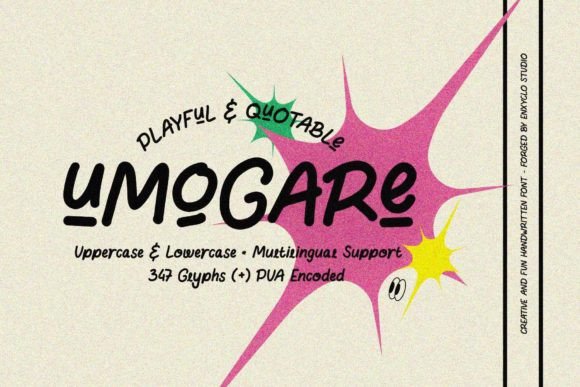
Umogare is a brilliant, fun, and aesthetically pleasing display font that adds energy and personality to any design. Created with bold expressions in mind, it’s particularly well-suited for use on cheerful topics such as branding for creative businesses, event promotions, social media content, and editorial designs. Its playful yet professional character makes it ideal for both digital and print formats where visual impact is key.
Display fonts like Umogare are typically used for headlines, logos, titles, or other prominent text elements rather than body copy. This means it plays an important role in the early stages of a design project — helping establish tone, brand identity, or emotional appeal before supporting details are added. Understanding how and when to deploy Umogare can significantly enhance your creative output while maintaining clarity and usability.
Preparation: Choosing the Right Context for Umogare
Before incorporating Umogare into your work, consider the context. Will it be used in a logo, a marketing banner, or a blog post header? Because it is a decorative typeface, it works best in scenarios where legibility isn’t the top priority but visual interest is. For example, if you're designing a promotional poster for a children's book launch or a festival announcement, Umogare could serve as the perfect headline font to grab attention and convey excitement.
It’s also essential to evaluate compatibility. Check that Umogare complements the rest of your design system — including colors, imagery, and supporting fonts. Pairing it with sans-serif or clean serif fonts often creates a balanced look. Additionally, ensure the platform or software you’re using supports custom fonts, especially if you're embedding them in web projects or mobile apps.
Choosing Complementary Colors
Umogare shines when paired with bright and vibrant color palettes. Think neon greens, electric blues, or pastel pinks to highlight its dynamic curves and expressive forms. If you're working in a digital environment, tools like Adobe Color or Coolors.co can help you find harmonious combinations that enhance the font's visual appeal without overwhelming it.
Implementation: Integrating Umogare into Your Workflow
Once you’ve decided where to use Umogare, the next step is implementation. In graphic design workflows, this might involve downloading the font from a trusted source like Google Fonts or Adobe Fonts, installing it locally, or linking it directly in web development projects via CSS. The method you choose depends largely on the platform and medium you're targeting.
For print materials, make sure the font is properly embedded in your PDF or vector file. This prevents issues when sharing or printing your design. In digital contexts, using @import or link tags ensures your website visitors see the font exactly as intended across different devices and browsers.
Workflow Example: Branding for a Startup
- Research Phase: Identify the startup’s target audience and brand personality. Is it playful and youthful, or more energetic and bold?
- Font Selection: Choose Umogare for the primary logo due to its unique flair and memorability.
- Design Drafts: Create mockups of the logo using high-contrast colors to test visibility and readability.
- Feedback Loop: Present the drafts to stakeholders and adjust based on their input — maybe tweaking spacing or experimenting with different weights within the Umogare family.
- Final Output: Integrate the finalized logo into business cards, websites, and social media assets, ensuring consistency across all touchpoints.
Using Umogare During Creative Execution
During the execution phase of your design, Umogare can act as a central stylistic element. Whether you're working in Photoshop, Illustrator, Figma, or Canva, importing and applying the font is straightforward. However, its artistic nature requires careful handling to avoid cluttering the layout or reducing overall readability.
Here are some practical tips for using Umogare effectively during the design process:
- Use Sparingly: Apply it only to short phrases or headings where its style can be appreciated without becoming distracting.
- Layer Thoughtfully: Combine it with subtle shadows, outlines, or gradients to add depth and make it stand out against busy backgrounds.
- Test at Different Sizes: Since it’s a display font, check how it looks at various sizes to ensure it maintains its charm without losing clarity.
- Balance with Simplicity: Counterbalance its boldness with simpler supporting fonts and layouts to maintain visual harmony.
Case Study: Social Media Campaign for a Lifestyle Blog
A lifestyle blogger wanted to refresh her Instagram feed with more engaging visuals. She chose Umogare for her post headers because they needed to catch attention quickly in a scroll-heavy environment. To streamline the process, she created a reusable template in Canva with pre-set font styles and color schemes. This allowed her to maintain consistency across posts while saving time on repetitive design tasks.
Post-Project Considerations: Ensuring Long-Term Usability
After completing a project using Umogare, it’s important to document its usage and keep track of how it performs in real-world applications. This helps maintain brand consistency over time and informs future design choices.
Consider creating a style guide that includes specifications for when and how to use Umogare. This should cover aspects like font size, color pairings, spacing, and recommended use cases (e.g., not for long paragraphs). Sharing this guide with your team or clients ensures everyone understands the font’s purpose and limitations.
Quality Control and Updates
As part of quality control, always verify that Umogare displays correctly across platforms and devices. Some systems may not support certain glyphs or weights, so testing is crucial. Additionally, stay informed about font updates or licensing changes by following the provider’s announcements. This keeps your projects compliant and avoids potential legal issues down the line.
Collaboration and Integration
Umogare doesn’t exist in isolation; it interacts with other design tools, collaborators, and decisions throughout a project. When working with a team, clearly communicate the font’s role in the design. Provide files with the font embedded or include download links so others can access it easily.
In web development, integrating Umogare may involve collaboration between designers and developers. Ensure that the font is optimized for performance — especially if it has multiple weights or styles. Using WOFF2 format and limiting the number of variants loaded can reduce page load times while preserving typographic flexibility.
Integration with CMS Platforms
If you're managing a website through a CMS like WordPress or Squarespace, installing Umogare can be done via plugins or by adding custom CSS. For instance, a marketer might embed it in landing pages to create eye-catching headlines that align with the campaign’s theme. Always preview these changes on different screen sizes to confirm responsiveness and accessibility.
Observations and Best Practices
Over time, users of Umogare have found that it works best when treated as a focal point rather than a background detail. Its stylized characters can become overwhelming if overused, so restraint is key. Another common observation is that pairing Umogare with minimalist iconography or photography often enhances its visual impact.
Additionally, many creators emphasize the importance of kerning and leading adjustments. While Umogare is visually appealing, slight tweaks to spacing can make the difference between a good design and a great one. Tools like Glyphs or FontForge allow advanced users to fine-tune these settings, though most modern design software offers built-in controls for basic adjustments.
Long-Term Use and Adaptability
While Umogare is excellent for specific uses, it's important to assess whether it remains relevant as trends evolve. Keep your design systems flexible by periodically reviewing your font choices and considering alternatives for new projects. That said, if your brand relies heavily on a joyful, artistic vibe, Umogare can continue to be a valuable asset year after year.
For those who want to build a versatile typography toolkit, combining Umogare with neutral, readable fonts ensures you can adapt to various content needs. For example, using it alongside Helvetica or Roboto allows for a contrast that highlights key messages while keeping the rest of the text easy to digest.
Conclusion: Making the Most of Umogare
Umogare is more than just a pretty font — it’s a strategic tool that can elevate the mood and visual appeal of your projects. By understanding its strengths and limitations, and by integrating it thoughtfully into your workflow, you can harness its creativity to produce compelling results. Whether you're designing a product package, crafting a presentation, or building a website, Umogare offers a fresh perspective on how typography can shape user experience and engagement.